> ## Documentation Index
> Fetch the complete documentation index at: https://docs.chaintable.com/llms.txt
> Use this file to discover all available pages before exploring further.
# Find data
> Choose foundational tables by use case, find public data, and inspect fields, sample records, and full table IDs.
Chaintable provides foundational tables you can query directly. You can also use data made public by other users.
## Common foundational tables
Foundational tables are organized into Spaces by purpose. In the examples below, `eth` means Ethereum mainnet.
| Space | Data |
| -------------------------------------------------------- | ------------------------------------------------------------------------------------------------------------------------------------------------------------------- |
| [chain](https://chaintable.com/space/chain/tables) | Blocks, transactions, contract events, and internal call traces in `chain.block.eth`, `chain.tx.eth`, `chain.event.eth`, and `chain.trace.eth`, respectively. |
| [contract](https://chaintable.com/space/contract/tables) | Contract creation details, code hashes, and proxy implementation addresses, for example in `contract.contract.eth`. |
| [token](https://chaintable.com/space/token/tables) | Token metadata, transfers, and approval events, for example in `token.token.eth`, `token.token_transfer.eth`, and `token.token_approve.eth`. |
| [nft](https://chaintable.com/space/nft/tables) | NFT collections, identifiers, transfers, and approval events. Examples include the collection table `nft.collection.eth` and transfer table `nft.nft_transfer.eth`. |
| [price](https://chaintable.com/space/price/tables) | Latest and historical USD token prices, for example in `price.price.eth`. |
| [address](https://chaintable.com/space/address/tables) | Assets an address has received and chains it has used, for example in `address.address_received_token.eth` and `address.address_used_chain`. |
| [cex](https://chaintable.com/space/cex/tables) | Exchanges, token listings, and trading-pair market data. Examples include the rate table `cex.cex_pair_rate` and daily candlestick table `cex.cex_pair_kline_1d`. |
## Start from Discover
1. Open [**Discover**](https://chaintable.com/discover) and choose a dataset, such as **token\_transfer** or **price**.
2. Select a chain in the Space's **Tables** list. For example, `price.eth` is the Ethereum price table.
3. Open the table details to view its type and **Schema**.
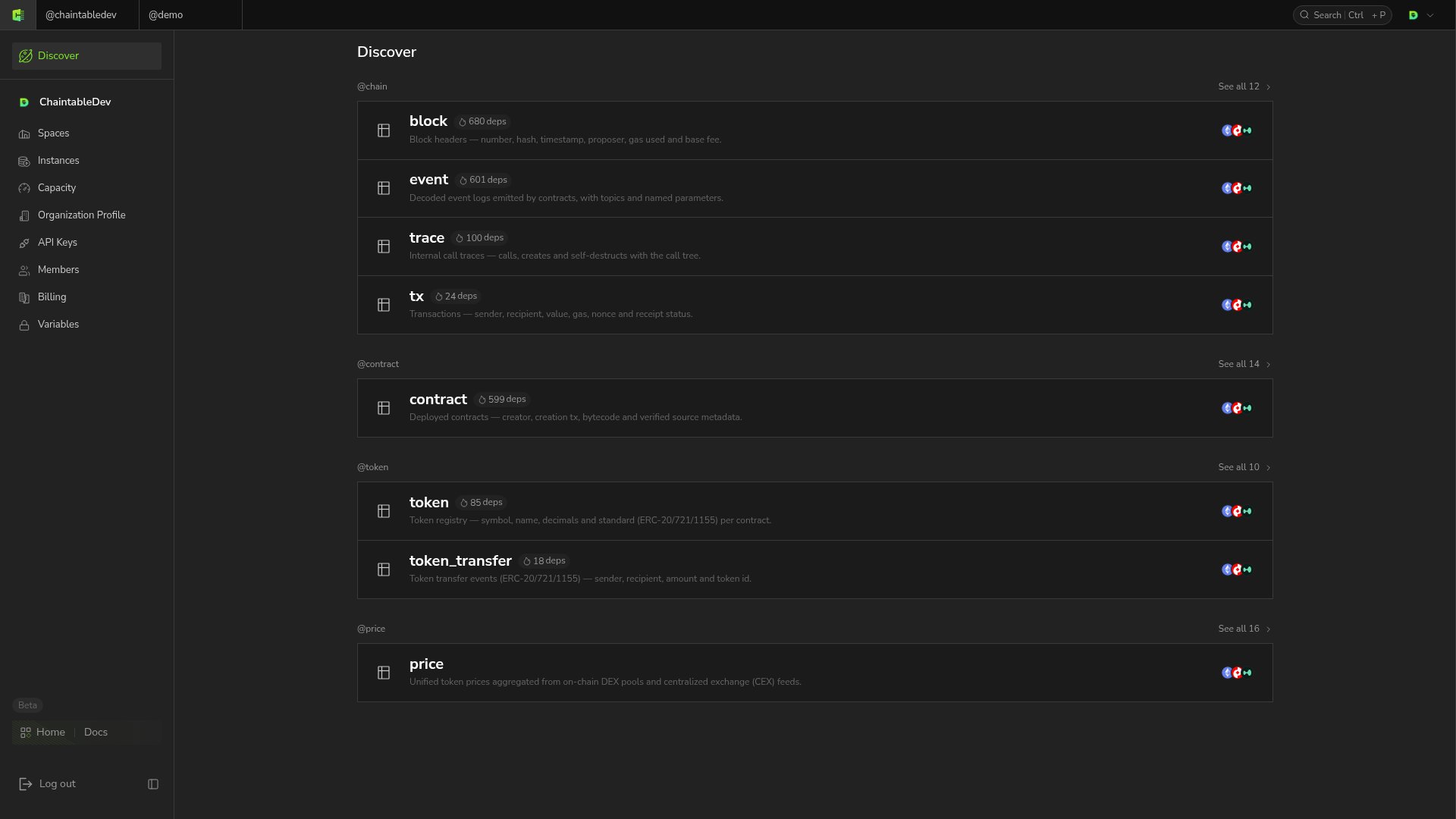 You can also open a public Space or table link shared by another user. Use **Search by name** in the Space's table list to filter names.
## Inspect structure and sample data
**Schema → Columns** lists fields, and **Indexes** lists indexes. Block and time tables also provide **Subtables**:
| Table type | Common data views |
| --------------- | ---------------------------------------------------------------- |
| **Normal** | View records directly |
| **Block Event** | **event** for event records |
| **Block State** | **latest** for current state, **archive** for historical changes |
| **Time** | **latest** for current values, **archive** for time series |
Open the data page to inspect sample rows, column names, and the full table ID.
## Record the full table ID
The display name in a table list omits the Space. For example, `price.eth` in the `price` Space has full ID `price.price.eth`.
SDK calls and SQL use full IDs. Historical subtables also require a suffix, such as `demo.pool_reserves.eth._archive`; **archive** is the UI entry label.
You can also open a public Space or table link shared by another user. Use **Search by name** in the Space's table list to filter names.
## Inspect structure and sample data
**Schema → Columns** lists fields, and **Indexes** lists indexes. Block and time tables also provide **Subtables**:
| Table type | Common data views |
| --------------- | ---------------------------------------------------------------- |
| **Normal** | View records directly |
| **Block Event** | **event** for event records |
| **Block State** | **latest** for current state, **archive** for historical changes |
| **Time** | **latest** for current values, **archive** for time series |
Open the data page to inspect sample rows, column names, and the full table ID.
## Record the full table ID
The display name in a table list omits the Space. For example, `price.eth` in the `price` Space has full ID `price.price.eth`.
SDK calls and SQL use full IDs. Historical subtables also require a suffix, such as `demo.pool_reserves.eth._archive`; **archive** is the UI entry label.