> ## Documentation Index
> Fetch the complete documentation index at: https://docs.chaintable.com/llms.txt
> Use this file to discover all available pages before exploring further.
# Read and write data
> Use the BlockDB SDK to read and write tables by primary key, block, and time.
Run these examples in a Chaintable Notebook. First [create the target tables](/guides/tables/create-and-manage), and replace `demo` with your Space ID.
Choose `NormalTable`, `EventTable`, `StateTable`, or `TimeTable` for the table type, and pass the full table ID when constructing the object.
## Normal Tables: insert and update
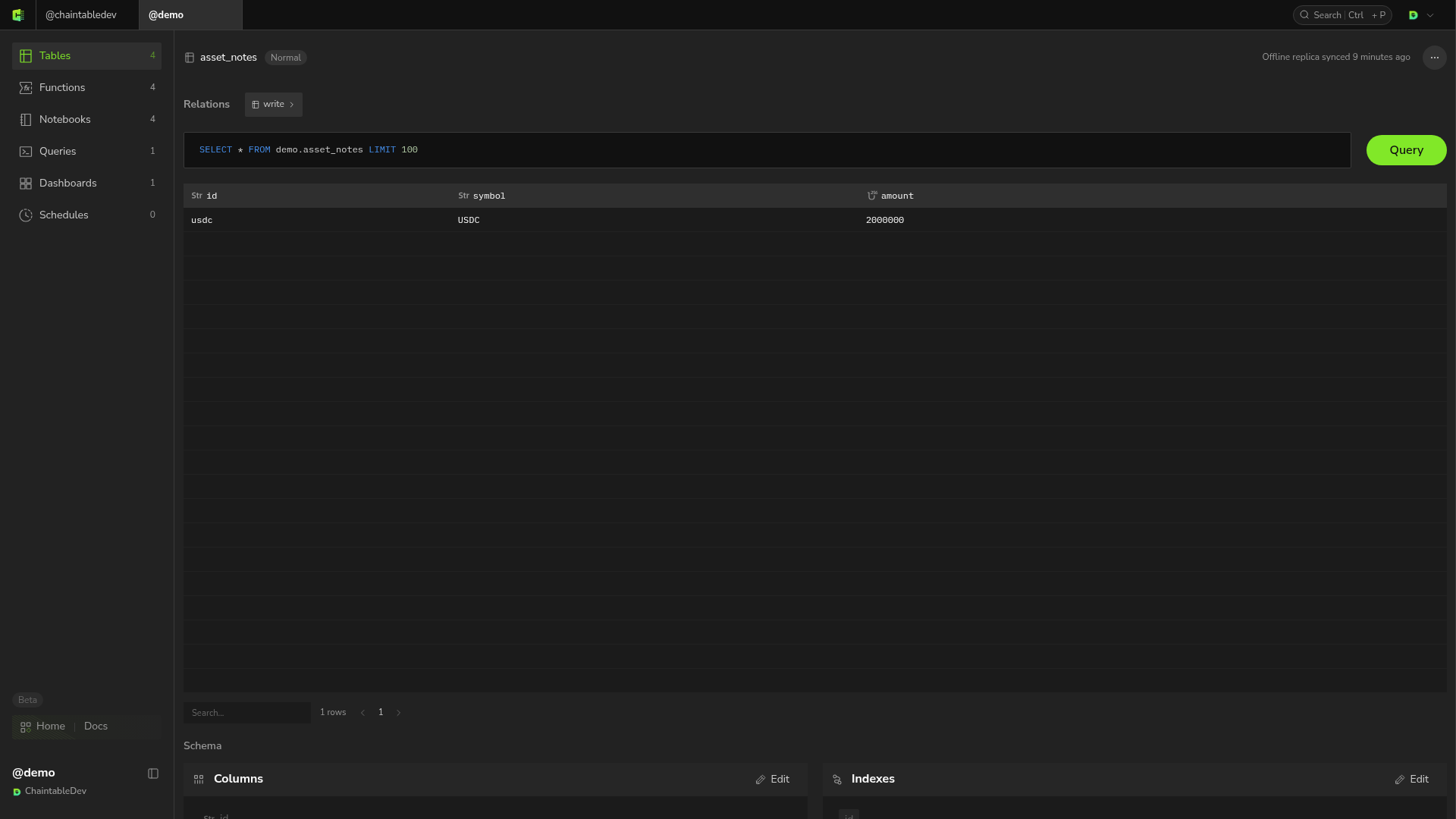
`demo.asset_notes` has fields `id: STRING`, `symbol: STRING`, and `amount: UINT256`.
```python theme={null}
from blockdb import NormalTable
notes = NormalTable('demo.asset_notes')
notes.write([{'id': 'usdc', 'symbol': 'USDC', 'amount': 1500000}])
```
Write the same `id` again to update the record:
```python theme={null}
notes.write([{'id': 'usdc', 'symbol': 'USDC', 'amount': 2000000}])
```
`write()` returns `True` when the request is accepted; the data may become visible shortly afterward. Use these methods to read it:
```python theme={null}
print(notes.get('usdc'))
print(notes.get_many(['usdc']))
print(notes.filter_rows("id = 'usdc'", limit=5))
```
`get()` returns `None` for a missing record. `get_many()` returns results in input ID order, with `None` at missing positions. `filter_rows()` accepts a SQL condition string without the `WHERE` keyword.
 Use `notes.delete(['record_id_to_delete'])` to delete normal-table records.
## Block tables: read current state and block records
Use `EventTable` for events and `StateTable` for state. This reads state built in [Track liquidity pool reserves](/quickstart/build/track-pool-reserves):
```python theme={null}
from blockdb import StateTable
reserves = StateTable('demo.pool_reserves.eth')
row = reserves.get('0xb4e16d0168e52d35cacd2c6185b44281ec28c9dc')
print(row)
```
This example omits `block_id`, so `StateTable.get()` reads the object's latest stored state without a consensus-height limit. Reading the latest state does not prove that all earlier blocks have been processed.
To read state at a specific block, use `StateTable(table_id, block_id)`. The block must be covered by the table's consensus height, or the read is rejected. See [How tables work](/guides/tables/model#block-data-and-processing-progress).
Use `get_block_rows()` for all records written in one block:
```python theme={null}
from blockdb import Block
block = Block(
id='0x147dd9f92835784656144336c9a1ae3e9bed659e8d5fb75516c9a956a0eb3c14',
height=25939930,
timestamp='2026-09-09T12:51:35Z',
)
print(reserves.get_block_rows(block))
```
Event reads use the same `get()` and `get_many()` pattern with `EventTable(table_id, block_id)`.
## Block tables: submit one block
Pass result rows and a block ID. The server fills in `block_height`, `block_id`, and `block_timestamp`.
```python theme={null}
from blockdb import StateTable
StateTable('demo.pool_reserves.eth').write(
[{
'id': '0xb4e16d0168e52d35cacd2c6185b44281ec28c9dc',
'reserve_usdc': '10126490434274',
'reserve_weth': '4043982044925209426729',
}],
'0x147dd9f92835784656144336c9a1ae3e9bed659e8d5fb75516c9a956a0eb3c14',
)
```
Submit an empty list for a processed block with no results so progress can advance. Usually, a [Pipeline](/guides/notebooks/build-pipeline) handles submission and writes for you.
## Time Tables: read and write by time
`demo.price_samples` uses the fixed fields `id`, `time_at`, and `value`, with `STRING` for `id`.
```python theme={null}
from blockdb import TimeTable
prices = TimeTable('demo.price_samples')
prices.write([{'id': 'usdc', 'value': 1.0}], '2026-09-09T12:00:00Z')
```
Once the data is visible, read a specified time and the latest value:
```python theme={null}
print(TimeTable('demo.price_samples', '2026-09-09T12:00:00Z').get('usdc'))
print(TimeTable('demo.price_samples').get('usdc'))
```
Time parameters accept RFC3339 strings with a timezone. Times without a timezone are treated as UTC. The server handles time bucketing; pass the original sample timestamp.
## Batch writes
Use `batch_write()` when the data exceeds what a single request can carry. The call differs by table type:
| Table type | Call | Every row must carry |
| ------------ | ------------------------------ | --------------------------------------------------------- |
| Normal Table | `batch_write(rows)` | The same set of fields |
| Time Table | `batch_write(rows)` | Its own `time_at` |
| Block Table | `batch_write(rows, bundle_id)` | Its own `block_id`, `block_height`, and `block_timestamp` |
Block tables are submitted one [block bundle](/guides/tables/model) at a time, replacing everything already stored for that bundle. The three block fields the server fills in for per-block writes must be present on every row here; if any is missing, the entire job fails.
Batch writes run asynchronously; `True` only confirms submission. To check the status after submission, see [Inspect asynchronous write jobs](/guides/tables/advanced#inspect-asynchronous-write-jobs).
Use `notes.delete(['record_id_to_delete'])` to delete normal-table records.
## Block tables: read current state and block records
Use `EventTable` for events and `StateTable` for state. This reads state built in [Track liquidity pool reserves](/quickstart/build/track-pool-reserves):
```python theme={null}
from blockdb import StateTable
reserves = StateTable('demo.pool_reserves.eth')
row = reserves.get('0xb4e16d0168e52d35cacd2c6185b44281ec28c9dc')
print(row)
```
This example omits `block_id`, so `StateTable.get()` reads the object's latest stored state without a consensus-height limit. Reading the latest state does not prove that all earlier blocks have been processed.
To read state at a specific block, use `StateTable(table_id, block_id)`. The block must be covered by the table's consensus height, or the read is rejected. See [How tables work](/guides/tables/model#block-data-and-processing-progress).
Use `get_block_rows()` for all records written in one block:
```python theme={null}
from blockdb import Block
block = Block(
id='0x147dd9f92835784656144336c9a1ae3e9bed659e8d5fb75516c9a956a0eb3c14',
height=25939930,
timestamp='2026-09-09T12:51:35Z',
)
print(reserves.get_block_rows(block))
```
Event reads use the same `get()` and `get_many()` pattern with `EventTable(table_id, block_id)`.
## Block tables: submit one block
Pass result rows and a block ID. The server fills in `block_height`, `block_id`, and `block_timestamp`.
```python theme={null}
from blockdb import StateTable
StateTable('demo.pool_reserves.eth').write(
[{
'id': '0xb4e16d0168e52d35cacd2c6185b44281ec28c9dc',
'reserve_usdc': '10126490434274',
'reserve_weth': '4043982044925209426729',
}],
'0x147dd9f92835784656144336c9a1ae3e9bed659e8d5fb75516c9a956a0eb3c14',
)
```
Submit an empty list for a processed block with no results so progress can advance. Usually, a [Pipeline](/guides/notebooks/build-pipeline) handles submission and writes for you.
## Time Tables: read and write by time
`demo.price_samples` uses the fixed fields `id`, `time_at`, and `value`, with `STRING` for `id`.
```python theme={null}
from blockdb import TimeTable
prices = TimeTable('demo.price_samples')
prices.write([{'id': 'usdc', 'value': 1.0}], '2026-09-09T12:00:00Z')
```
Once the data is visible, read a specified time and the latest value:
```python theme={null}
print(TimeTable('demo.price_samples', '2026-09-09T12:00:00Z').get('usdc'))
print(TimeTable('demo.price_samples').get('usdc'))
```
Time parameters accept RFC3339 strings with a timezone. Times without a timezone are treated as UTC. The server handles time bucketing; pass the original sample timestamp.
## Batch writes
Use `batch_write()` when the data exceeds what a single request can carry. The call differs by table type:
| Table type | Call | Every row must carry |
| ------------ | ------------------------------ | --------------------------------------------------------- |
| Normal Table | `batch_write(rows)` | The same set of fields |
| Time Table | `batch_write(rows)` | Its own `time_at` |
| Block Table | `batch_write(rows, bundle_id)` | Its own `block_id`, `block_height`, and `block_timestamp` |
Block tables are submitted one [block bundle](/guides/tables/model) at a time, replacing everything already stored for that bundle. The three block fields the server fills in for per-block writes must be present on every row here; if any is missing, the entire job fails.
Batch writes run asynchronously; `True` only confirms submission. To check the status after submission, see [Inspect asynchronous write jobs](/guides/tables/advanced#inspect-asynchronous-write-jobs).