> ## Documentation Index
> Fetch the complete documentation index at: https://docs.chaintable.com/llms.txt
> Use this file to discover all available pages before exploring further.
# Get address ETH balance
> Use a Function to read a wallet's ETH balance, look up the current price, and calculate its USD value.
This tutorial reads the ETH balance of Ethereum mainnet address `0xd8da6bf26964af9d7eed9e03e53415d37aa96045`, then uses the ETH price in `price.price.eth` to calculate its USD value.
Sign in to the [Chaintable console](https://chaintable.com/spaces) and open your Space. This tutorial uses `demo`; replace it with your Space ID.
## 1. Create a Function
In **Functions**, click **+** in the upper right, enter `wallet_eth_value`, and click **Save and open**. Replace the default code with:
```python theme={null}
def _(address):
from blockdb import TimeTable
from leafage import ChainState
block = ChainState.get_latest_block('eth')
chain = ChainState('eth', block['id'])
balance_wei = chain.get_address_balance(address)
price = TimeTable('price.price.eth').get(
'0xeeeeeeeeeeeeeeeeeeeeeeeeeeeeeeeeeeeeeeee'
)
balance_eth = balance_wei / 10 ** 18
return {
'address': address,
'block_id': block['id'],
'balance_wei': str(balance_wei),
'balance_eth': balance_eth,
'eth_price_usd': price['value'],
'price_time': price['time_at'],
'value_usd': balance_eth * float(price['value']),
}
```
`ChainState` reads the wallet balance at the latest block, and `TimeTable` reads the ETH price. Divide the balance in wei by `10 ** 18` to get ETH.
## 2. Set test parameters
Click **+** in the parameter bar below the editor and add:
| Setting | Value |
| ------------------ | --------- |
| **Parameter name** | `address` |
| **Parameter Type** | `ADDRESS` |
Save the parameter and Function. Enter this value in the `address` input:
```text theme={null}
0xd8da6bf26964af9d7eed9e03e53415d37aa96045
```
Move focus out of the input, then click **Run**.
## 3. View the result
**Return** shows the balance, block, price and price timestamp, and calculated USD value.
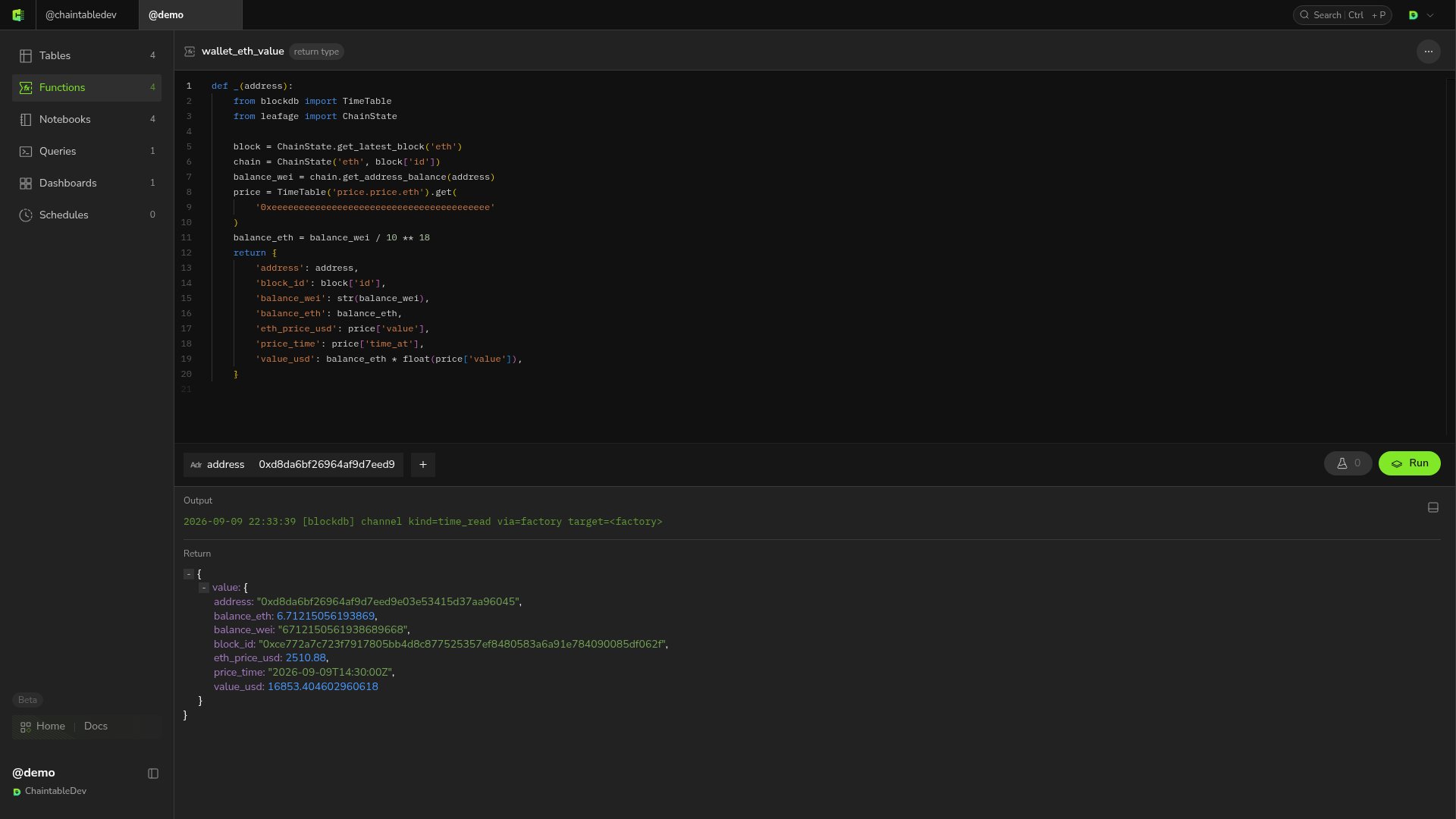 | Field | Meaning |
| --------------- | -------------------------------------------------------------- |
| `balance_wei` | Raw balance returned as a string to preserve integer precision |
| `balance_eth` | Balance converted to ETH |
| `block_id` | Block ID used for the balance query |
| `eth_price_usd` | ETH price in USD from the current price record |
| `price_time` | Timestamp of that price record |
| `value_usd` | ETH amount multiplied by its USD price |
The balance in the screenshot is about `6.71215 ETH`; your result will vary as the onchain balance changes. The USD value is estimated using the latest price record, whose timestamp is returned as `price_time`.
## Optional: call from an external application
The saved Function ID is `demo.wallet_eth_value`. To call it from another application, pass the wallet address through OpenAPI. See [Call other Functions](/guides/openapi/calling#call-other-functions).
| Field | Meaning |
| --------------- | -------------------------------------------------------------- |
| `balance_wei` | Raw balance returned as a string to preserve integer precision |
| `balance_eth` | Balance converted to ETH |
| `block_id` | Block ID used for the balance query |
| `eth_price_usd` | ETH price in USD from the current price record |
| `price_time` | Timestamp of that price record |
| `value_usd` | ETH amount multiplied by its USD price |
The balance in the screenshot is about `6.71215 ETH`; your result will vary as the onchain balance changes. The USD value is estimated using the latest price record, whose timestamp is returned as `price_time`.
## Optional: call from an external application
The saved Function ID is `demo.wallet_eth_value`. To call it from another application, pass the wallet address through OpenAPI. See [Call other Functions](/guides/openapi/calling#call-other-functions).