

0xd8da6bf26964af9d7eed9e03e53415d37aa96045, then uses the ETH price in price.price.eth to calculate its USD value.
Sign in to the Chaintable console and open your Space. This tutorial uses demo; replace it with your Space ID.
1. Create a Function
In Functions, click + in the upper right, enterwallet_eth_value, and click Save and open. Replace the default code with:
ChainState reads the wallet balance at the latest block, and TimeTable reads the ETH price. Divide the balance in wei by 10 ** 18 to get ETH.
2. Set test parameters
Click + in the parameter bar below the editor and add:
Save the parameter and Function. Enter this value in the
address input:
3. View the result
Return shows the balance, block, price and price timestamp, and calculated USD value.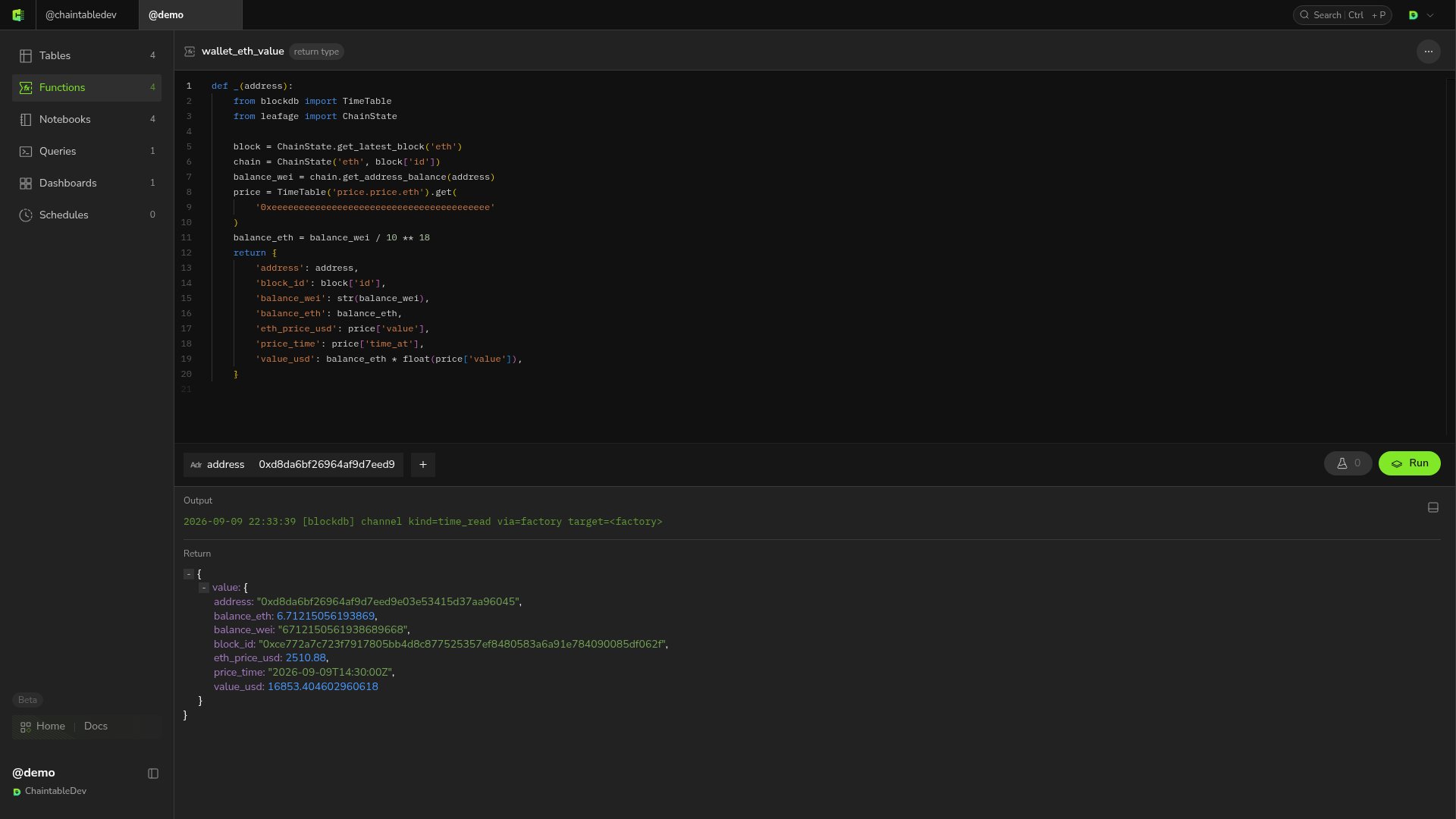
The balance in the screenshot is about
6.71215 ETH; your result will vary as the onchain balance changes. The USD value is estimated using the latest price record, whose timestamp is returned as price_time.
Optional: call from an external application
The saved Function ID isdemo.wallet_eth_value. To call it from another application, pass the wallet address through OpenAPI. See Call other Functions.